
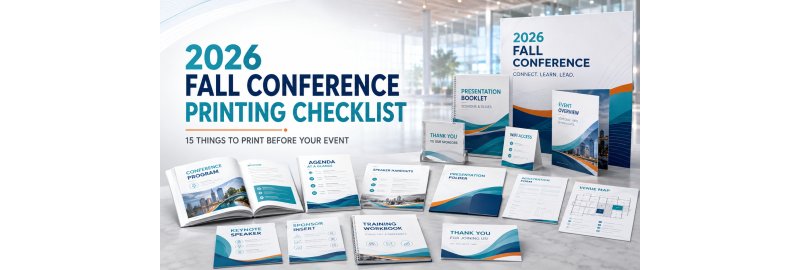
The 2026 Fall Conference Printing Checklist: 15 Things to Print Before Your Event
September conference season does not begin when attendees arrive. It begins when programs, handouts, sponsor pieces and room signs enter production. With conferences, showcases and expos filling 2026 industry calendars throughout September and the rest of fall, planners are already in the purchasing window.
What should you print for a conference? Most events need materials for five jobs: helping people check in, showing them where to go, supporting sessions, giving sponsors visibility and creating a useful follow-up after the event. The 15 items below cover those needs without turning every piece of information into another oversized booklet.
Table of Contents
-
Conference programs
-
Quick-reference agendas
-
Presentation booklets
-
Speaker handouts
-
Worksheets and note pages
-
Brochures
-
Flyers
-
Presentation folders
-
Registration sheets and forms
-
Venue maps and wayfinding sheets
-
Sponsor materials
-
Posters and signs
-
Table materials
-
Training manuals and workbooks
-
Post-event handouts
The 15 Conference Materials to Print
1. Conference programs
The program is the event's complete reference guide. It can include the full schedule, speaker biographies, session descriptions, sponsor recognition, venue information and event policies. For multi-day events, booklet printing keeps a large amount of information organized in one piece.
2. Quick-reference agendas
An agenda is not necessarily a smaller version of the program. It should give attendees the information they will check repeatedly: times, session names, room numbers and breaks. A one-page or folded agenda is easier to carry than a full program and less expensive to replace if the schedule changes.
3. Presentation booklets
Turn slide decks, charts, research or case studies into a booklet attendees can follow during a presentation. Leave room beside key material for notes. Longer content may benefit from coil, comb, wire or perfect binding, while shorter pieces may work well as saddle-stitched booklets.
4. Speaker handouts
Print session-specific handouts separately when speakers are still revising their material. This prevents one late presentation from holding up the full program. Include the session title, speaker, event name and a tested QR code linking to updated resources.
5. Worksheets and note pages
Workshops need space for attendees to participate, not just read. Print exercises, checklists, assessment pages, guided notes or action plans on an uncoated stock that is comfortable to write on.
6. Brochures
Brochures are best for evergreen information about the organization, membership, services or a major initiative. Use a fold and paper stock that match how the piece will be distributed. Best Value Copy offers brochure printing with multiple paper and folding choices.
7. Flyers
A flyer should focus on one action: visit a booth, attend a future event, register for a program, download a resource or contact the organization. Keep the message brief and make the next step obvious. Use flyer printing for inserts, takeaways and timely announcements.
8. Presentation folders
Folders turn separate pieces into an organized attendee, sponsor, media or speaker kit. Decide what will go inside before choosing pocket and business-card-slot options. Because presentation folders can require more production time than loose sheets, finalize them early.
9. Registration sheets and forms
Prepare check-in lists, walk-in registration forms, release forms, evaluation sheets and receipt forms as needed. Keep one clean master copy available for emergency reproductions, and only collect information the event actually needs.
10. Venue maps and wayfinding sheets
Print maps for entrances, elevators, restrooms, meal areas, exhibit halls and breakout rooms. Use large labels and match every printed room name to the program and signs. A simple black-and-white staff map can be different from the attendee version.
11. Sponsor materials
Sponsor collateral may include program ads, branded inserts, flyers, offer cards and session materials. Give every sponsor one written specification sheet covering final size, bleed, file format and deadline. This reduces mismatched files and last-minute resizing.
12. Posters and signs
Prioritize signs that prevent confusion: registration, session rooms, speaker check-in, accessibility information, meals and schedule updates. Keep wording readable from several feet away. Large posters can also support featured sessions, research displays and sponsor recognition.
13. Table materials
Print reserved signs, tabletop schedules, discussion prompts, exhibitor information sheets and resource cards. Label packages by table or room before shipping so setup crews do not have to sort everything on the event floor.
14. Training manuals and workbooks
For certification programs, workshops and continuing education, a durable manual can remain useful long after the conference. Choose the binding based on page count and use. A workbook that needs to lie flat may require a different format than a reference manual. Review manual printing and binding options before finalizing the file.
15. Post-event handouts
Do not let the final session be the end of the conversation. A post-event sheet can include key takeaways, resource links, feedback instructions, continuing education details, the next event date and a clear follow-up contact.
How Many Copies Should You Order?
Start with confirmed registration, then adjust for where and how each item will be distributed. These figures are practical starting points, not fixed rules.
| Printed item | Starting quantity |
|---|---|
| Programs and agendas | One per attendee, plus 5% to 10% |
| Session handouts | Expected session attendance, plus about 10% |
| Maps | One per attendee, plus registration-desk backups |
| Brochures and flyers | Attendee count plus expected booth or public traffic |
| Staff packets | One per staff member, plus two complete backup sets |
For 500 registered attendees, a 5% program buffer means 525 copies. Avoid automatically applying the same quantity to every item. A breakout-room worksheet and a general conference map rarely need identical counts.
When Should Conference Materials Go to Print?
-
Three to four weeks before: Lock finished sizes, paper, binding, folder specifications, sponsor requirements and delivery details.
-
Two weeks before: Submit long programs, presentation booklets, manuals, folders, posters and other pieces with limited late-changing information.
-
One week before: Finalize agendas, maps, registration sheets and speaker handouts after checking every time, room and name.
-
Before approval: Build time for file review, proofing, production, shipping and venue receiving procedures.
Best Value Copy produces most orders within 24 to 48 hours at no additional charge. Production time is not the same as arrival time, however, and specialized products can take longer. Ordering earlier leaves time to correct a file or shipping issue without creating an event-day emergency.
Final Print-File Check
Before uploading the order, confirm:
-
Finished size: The document size matches the size selected in the order.
-
Print-ready PDF: Export the final artwork as a high-quality PDF, not a screenshot or editing link.
-
Bleed: Extend edge-to-edge backgrounds 0.125 inch beyond the trim line when required.
-
Safe area: Keep logos, page numbers, QR codes and important text away from cut and fold lines.
-
Page count: Confirm that covers, blank pages and double-sided pages are intentional.
-
Working links: Test every QR code from the exported PDF and from a printed sample.
-
Version control: Upload one clearly named, approved file for each piece.
Designing in Canva? Use the Canva-to-print PDF export checklist before sending the file.
Frequently Asked Questions
What are the most important printed materials for a conference?
Start with the materials attendees need to navigate and participate: an agenda, program, map, signs, session handouts and worksheets. Then add sponsor pieces, brochures, folders and post-event resources based on the event format.
How early should I order conference printing?
Begin print planning three to four weeks before the event. Submit complex or bound pieces first, then finalize loose agendas, maps and speaker handouts closer to the date if information is still changing.
How many extra conference programs should I print?
A 5% to 10% buffer is a useful starting point for programs and agendas. Increase or reduce it based on walk-in registration, past attendance and whether staff, speakers, sponsors or exhibitors also need copies.
Do I still need printed materials if the conference has an app?
Usually, yes. Apps are useful for updates, but printed agendas, maps, signs and workbooks remain available when a phone is charging, Wi-Fi is limited or attendees need to write. Use QR codes to connect print to the most current digital information.
Put the Entire Event Order on One Checklist
The best conference printing plan is not the one with the most pieces. It is the one that gives every attendee, presenter, sponsor and staff member the right information at the right moment.
Best Value Copy offers programs, booklets, color copies, brochures, flyers, manuals, posters, presentation folders and custom printing in the quantities your event actually needs. Start early, separate fixed content from late-changing content and place your order with enough time for a careful final check.


