A booklet that looks good in a PDF can still be awkward to use. A training workbook may need to stay open beside a laptop. An event program needs to be easy to carry. A product catalog needs readable specifications and convincing photographs.
Choose the binding, finished size and paper before completing the layout. Those decisions affect page count, inside margins, cover construction and the file you submit.
What is booklet printing?
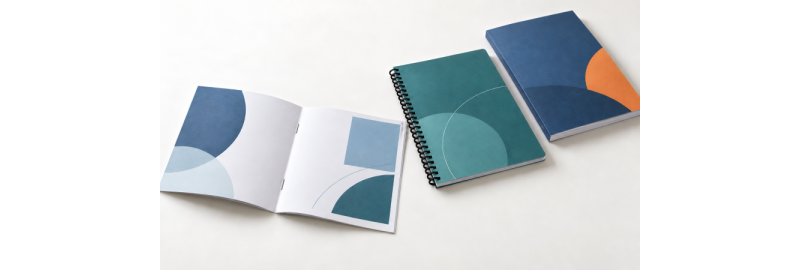
Booklet printing turns a multipage document into a bound publication, such as a program, catalog, handbook or workbook. The pages may be folded and stapled, punched and mechanically bound, or glued into a paper cover. A folded brochure is usually a single sheet divided into panels; a booklet is read through successive pages.
The guidance below explains general printing principles. BestValueCopy options are identified separately; compatibility depends on the selected job.
Choose binding around how the booklet will be used
Start with three questions: Will readers write in it? Must it stay open hands-free? Does it need a printable square spine? The answers usually narrow the choice faster than appearance alone.
Quick booklet binding comparison
| Binding | Useful for | Handling and tradeoff |
|---|---|---|
| Saddle stitch | Short programs and marketing pieces | Staples through a fold; compact, with no square printable spine. Bulk limits suitability. |
| Plastic coil | Workbooks and training manuals | Flexible continuous spiral; opens flat and folds back. Needs clearance for punched holes. |
| Plastic comb | Reports that may need revisions | Opens flat; can be reopened with suitable equipment. Broad plastic spine limits fold-back handling. |
| Twin-loop wire | Presentations and reference books | Paired metal loops; opens flat and folds back. Wire can deform if crushed. |
| Perfect binding | Thicker catalogs and publications | Glued paper cover with a square spine. Usually needs more inside margin and does not lie fully flat. |
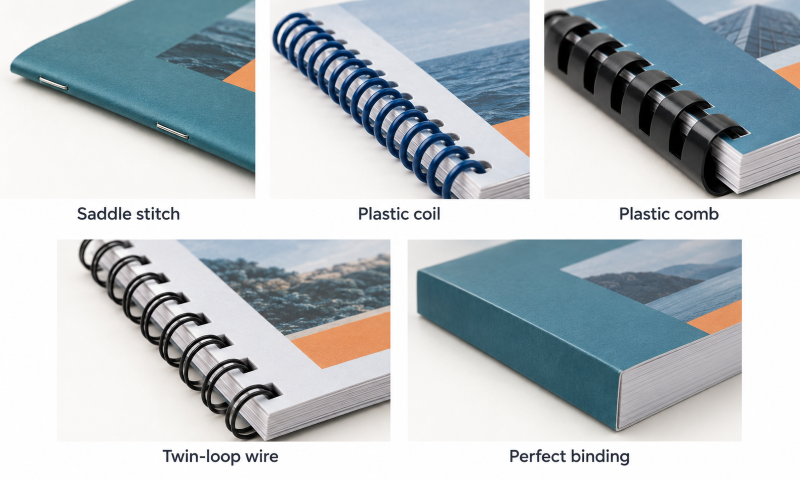
Saddle stitching joins nested, folded sheets with staples through the center fold. It is different from stapling a stack along its left edge. It suits relatively slim publications; heavier paper reaches the practical bulk limit sooner.
Perfect binding creates a paperback-style book. Its suitability and spine width depend on the thickness of the complete page block, not page count alone. Spine text is possible only when the approved spine is wide enough.
Coil and wire both support hands-free reading. Plastic coil is flexible and useful for frequent handling; twin-loop wire offers a tidy presentation but can be bent out of shape. Comb can be practical when pages may need replacement, although revisions still require compatible supplies and equipment. See GBC’s binding overview for the mechanical differences.
There is no universal maximum page count for these methods. Paper thickness, cover stock, binding supplies and the printer’s equipment all matter.
BestValueCopy lists these five methods, plus tape and velo binding. Compare the current booklet printing options once you know how the finished piece needs to function.
Match the format to the task
- Event program or short conference guide: consider saddle stitch for a compact handout. Use the conference printing checklist to coordinate related materials.
- Training manual or workbook: consider coil or wire when people need to read and write without holding pages open.
- Product catalog: consider saddle stitch for a slim edition or perfect binding when the page block supports a square spine.
- School handbook: choose for reading frequency, durability and revisions. The school handbook printing checklist covers the broader approval process.
- Marketing booklet: let the amount of content and distribution method determine the format. A heavier cover alone does not make a piece more effective.
Count pages, sheets and covers separately
A page is one side of a leaf in the finished booklet. A leaf has two page surfaces. A larger sheet folded once produces two leaves, or four pages.
That construction explains why a standard saddle-stitched booklet has a total page count divisible by four. Three folded sheets produce 12 pages; five produce 20. Blank surfaces still occupy pages, even when they have no printed page number.
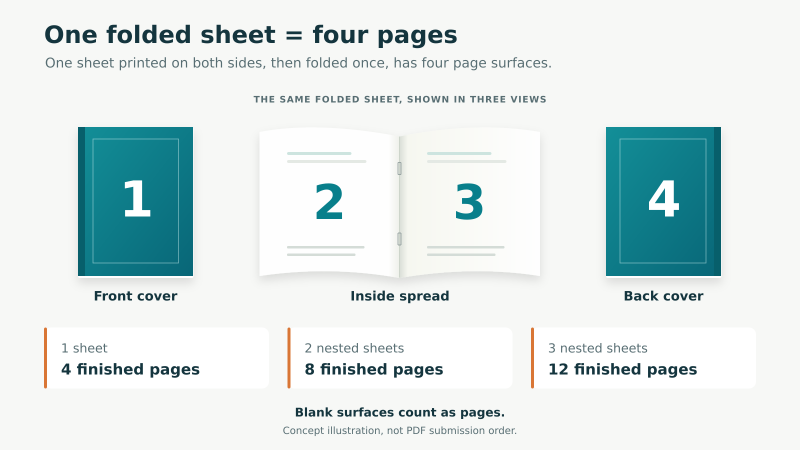
Cover terminology can change what an advertised count means. A 20-page saddle-stitched booklet including its cover has 16 interior pages plus four cover surfaces. A job described as 20 interior pages plus a four-page cover has 24 pages altogether. Confirm which convention the order form uses.
A self-cover uses the same stock for cover and interior. A separate heavier cover changes the material, but its surfaces still belong in the physical page plan. Show intended blank inside covers explicitly.
Coil, comb and wire do not inherit the folded-sheet multiples-of-four rule. Perfect-binding requirements vary with the printer’s production method. Do not add pages merely because another company’s guide specifies an increment.
As saddle-stitched sheets accumulate, inner sheets can project farther outward before trimming. This is called creep. Avoid critical content close to outer edges, and let the printer handle imposition and creep compensation. Adobe explains the underlying booklet construction.
Choose paper for reading, writing and image quality
Interior stock carries most of the reading experience. Cover stock adds stiffness and protection. Choose them together because a heavier interior increases bulk throughout the booklet.
For workbooks, favor a surface that works with the intended pens or pencils. Uncoated paper is generally the practical starting point. Test a sample if people will write directly on printed areas.
For photo-heavy catalogs, coated stock can support crisp image detail. Gloss adds sheen; matte-coated stock reduces it. Matte and uncoated are not interchangeable terms. A matte-coated sheet may still behave differently from an uncoated sheet when written on. See the matte vs. glossy printing guide.
Paper weight also needs context. An 80 lb text stock is not equivalent to an 80 lb cover stock because the categories use different basis sizes. GSM measures mass per square meter, not thickness or stiffness directly.
BestValueCopy’s paper recommendations list booklet-interior examples including 20# White Bond, 24# Opaque Laser Bond and 32# Glossy Text Bond, with separate paper-cover choices. Confirm availability for your binding and compare physical samples when feel matters.
Check opacity as well as weight: dense images can show through some papers. For repeated use, ask about compatible protective covers or cover lamination. On BestValueCopy’s site, “hard” paper-cover selections should not be mistaken for case-bound hardcover books.
Set a readable size and a useful color plan
Common industry formats include 5.5 × 8.5 inches for portable pieces and 8.5 × 11 inches for reference materials. These are examples, not a complete BestValueCopy size list. Confirm the available finished dimensions before designing.
Choose size around the hardest content to read: a price table, worksheet or labeled diagram. Print a sample page at actual size. Shrinking a letter-size layout can make both type and writing space unusable.
Color helps when photographs or diagrams carry information. Black-and-white can suit text-heavy material, but check that chart categories remain distinguishable in grayscale. BestValueCopy directs mixed color and black-and-white requests to a custom quote.
Prepare the PDF in the correct order
Submit individual pages in normal reading order unless the printer explicitly requests another arrangement. Designing with facing pages is fine; exporting two facing pages as one oversized PDF page is a different decision.
Reader spreads show pages as a reader sees them. Printer spreads rearrange pages for printing, folding and binding. That production arrangement is called imposition and is normally handled by the printer.
A practical file-preparation checklist
- Match the trim size. Set the document to the finished page dimensions, then add bleed separately. Keep interior page dimensions consistent.
- Confirm cover handling. BestValueCopy’s order help uses the first and last one or two PDF pages for selected printed covers, depending on sidedness. Confirm the specific cover workflow, especially for a perfect-bound wraparound cover and spine.
- Preserve intentional blanks. Check inside covers, section starts and the last page. Never rely on the printer to guess where a blank belongs.
- Supply real bleed artwork. Extend edge-touching backgrounds beyond trim. Merely enabling a bleed checkbox does not create missing image content.
- Protect the safe area and gutter. Keep essential text inside the safe boundary. Allow extra room at the binding edge for holes or the part of the page that is difficult to open.
- Check effective image resolution. Around 300 pixels per inch at final printed size is a common target for photographs. Enlarging a small image reduces effective resolution; changing its resolution label cannot restore missing detail. Keep vector text and logos as vectors where possible.
- Check fonts and graphics. Embed fonts when licensing permits. Confirm no missing or substituted characters, broken image links or disappearing objects in the exported PDF.
- Follow the requested color and PDF settings. Do not convert automatically to an arbitrary CMYK profile, flatten everything or add crop marks by habit. Ask which settings the printer needs.
- Inspect the exported file. Check actual page dimensions, thumbnails, orientation, links or QR codes, page count and every cover surface. A PDF viewer showing two pages side by side does not necessarily mean the file contains exported spreads.
Bleed, trim and safe area do different jobs
Bleed is artwork outside the finished edge. Trim is the cut boundary. The safe area is inside that boundary and protects essential content. The binding margin, often called the gutter, provides additional room at the spine or punched edge.
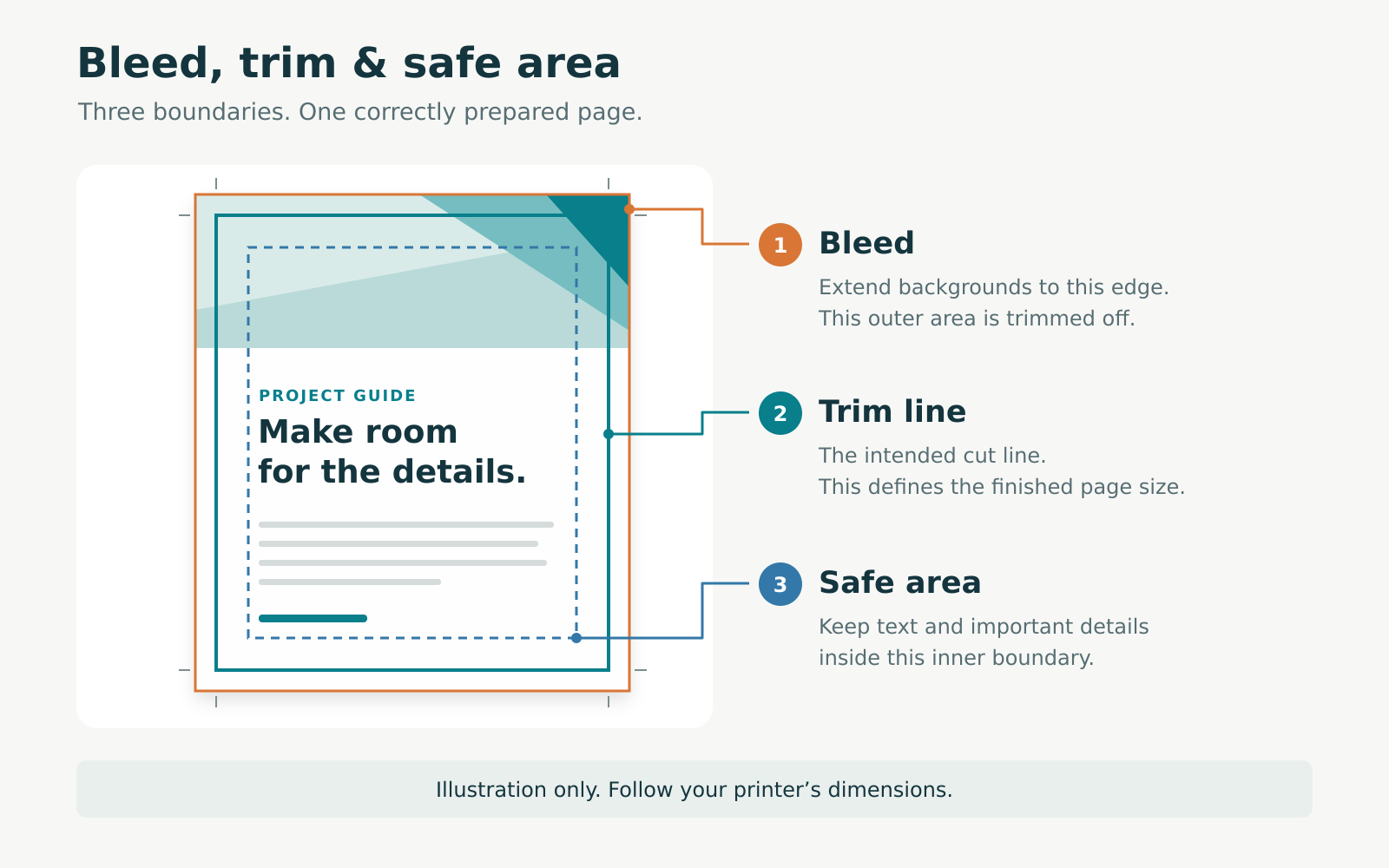
A common bleed example is 0.125 inch on each side. An 8.5 × 11-inch trim area would then have artwork extending to 8.75 × 11.25 inches, before any printer marks. This is an illustration, not a universal BestValueCopy specification. Confirm bleed, safe margins and binding clearance for the actual job.
Canva, InDesign and Illustrator
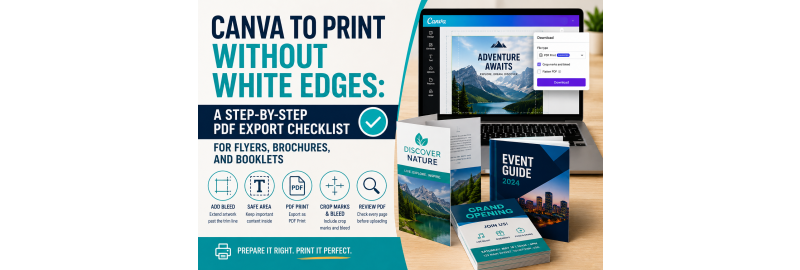
In Canva, use PDF Print and verify every required page is included. The Canva PDF export checklist provides a fuller walkthrough; confirm current job instructions for crop marks, bleed and color settings.
In InDesign, preflight the document and export a print PDF as pages unless instructed otherwise. In Illustrator, check that artboards represent the intended pages, with consistent dimensions and the correct export sequence. Use the printer’s requested preset rather than assuming every PDF/X option is interchangeable.
Screens and printed paper reproduce color differently. Review why printed colors differ from your screen before approving brand-critical artwork.
If the cover arrangement or file requirements remain unclear, ask BestValueCopy about your job before uploading the final version.
Compare booklet costs using the same specifications
Booklet cost depends on quantity, page count, size, color, stock, cover treatment and binding, plus applicable finishing, proofing and shipping. Compare complete configurations rather than a headline starting price.
Request comparisons with the same page count, paper, cover and delivery destination. If changing a specification, change one at a time so you can see the tradeoff.
A larger quantity may lower the cost per booklet while increasing total spending and leftover inventory. A handbook with frequently changing policies may justify a smaller run. Choosing fewer pages is useful only if the remaining content stays readable.
Treat production time and shipping transit as separate parts of the schedule. Leave room for file corrections and proof approval.
Turn your choices into an order
Write a short job specification: purpose, quantity, finished size, binding, total page count, cover treatment, interior paper, color plan and required arrival date. Compare it against the PDF before ordering.
Then use the BestValueCopy booklet configurator to check the available combination. For a project where paper feel, page order or color could cause an expensive reprint, consider the paper-proof option and allow additional time.
Frequently asked questions
Can I print a 10-page saddle-stitched booklet?
A standard folded saddle-stitched booklet needs a total divisible by four. A 10-page design would usually need to become 12 pages, with two intentional blank or additional content pages. Confirm whether your count includes cover surfaces.
Do blank inside covers count as pages?
Yes, they count as physical page surfaces. Keep them in the page plan and confirm how the printer wants them represented in the PDF and order form.
Is wire binding the same as spiral binding?
Usually not. Plastic spiral binding uses one continuous coil; twin-loop wire uses paired metal loops. Both can open flat and fold back, but their hardware and handling differ.
Can I use a heavier cover with lighter inside pages?
Often, yes. This can add cover stiffness without increasing the bulk of every interior page. Availability and compatible materials depend on the binding and printer.
Does a PDF Print export guarantee sharp photographs?
No. Export quality cannot replace detail missing from the original image. Check the source image’s resolution at its final printed size and inspect the exported PDF.
Should I reorder pages so the first and last pages sit together?
Normally, no. Supply individual pages in reading order and let the printer impose them. Use printer spreads only when the printer specifically requests them.