
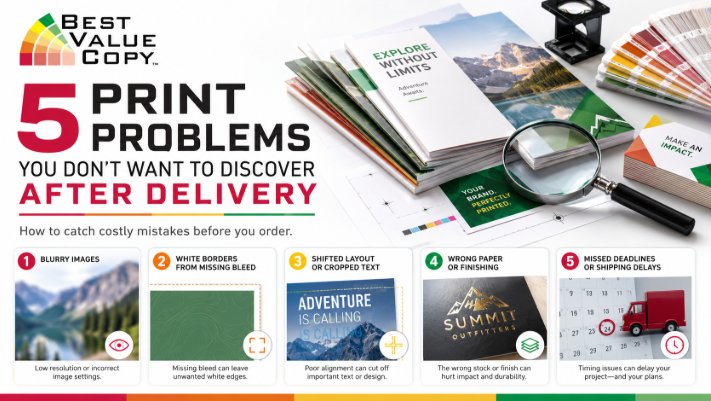
5 Print Problems You Don’t Want to Discover After Delivery
You open the box. The printing looks good at first glance. Then you notice it.
An image is blurry. Important artwork stops short of the edge. The paper does not feel the way you expected. A booklet was ordered with the wrong finishing option. Or a document that looked perfect on your computer does not look quite the same in print.
By the time a finished printing order is delivered, correcting a preventable file or ordering mistake can mean lost time, added expense and a missed deadline.
Fortunately, many common printing problems can be caught before an order ever reaches production.
Here are five print problems you definitely do not want to discover after delivery, along with practical ways to help prevent them.
1. Your Images Look Blurry or Soft in Print
An image can look surprisingly good on a phone or computer screen and still disappoint when printed.
That is because a screen can hide problems that become much easier to see once an image is enlarged and printed on paper. A small image downloaded from a website, screenshot from social media or repeatedly compressed can lack enough image information for the size at which you want to print it.
This becomes especially noticeable on:
Posters, flyers, brochures, menus, presentation materials, booklet covers and other pieces where photography or detailed graphics play a major role.
How to help prevent blurry printing
Start with the highest-quality original images available rather than downloading reduced versions from websites or social platforms.
Then review the finished PDF at the actual size you plan to print. Pay close attention to logos, small photographs, fine graphics and any image that has been significantly enlarged.
For an important marketing piece, do not assume that because an image looks sharp at 25 percent zoom it will look equally sharp when printed.
Best Value Copy uses professional production equipment for both color and black-and-white printing, including Xerox iGen color presses. According to Best Value Copy, its color equipment is designed to provide consistent images, fuller solid colors and sophisticated color matching throughout a print run.
Good printing equipment can reproduce a strong file beautifully. It cannot, however, restore detail that was never present in the original image.
2. You Get Unexpected White Edges Around the Design
If your background color, photograph or graphic is supposed to extend all the way to the edge of a printed page, the job requires what printers call a bleed.
Without the correct setup, you may receive a finished piece with an unwanted white border around one or more edges.
What does bleed mean in printing?
Bleed means the printed design extends beyond the final trim line so the piece can be cut down to its finished size without leaving an unintended white edge.
Best Value Copy specifically provides a bleed option for custom printing and describes it as printing to the edge of the page.
Before submitting your file
Ask yourself a simple question:
Does anything in my design need to touch the very edge of the finished piece?
If the answer is yes, make sure the design has been prepared for full-bleed printing and select the appropriate bleed option when ordering.
Also keep important text, logos, QR codes and other critical information comfortably away from the trim edge. Backgrounds can extend beyond the finished edge. Important content should not.
This small distinction can make the difference between a piece that looks intentionally designed and one that looks accidentally cropped.
3. Your PDF Does Not Look the Way the Original File Did
One of the most frustrating printing problems is also one of the easiest to reduce.
You create a document in Word, PowerPoint, a design program or another application. It looks perfect on your computer. Then it is opened on another system and something changes.
A font may substitute. Spacing can shift. An image can move. A page break may appear somewhere unexpected.
This is one reason Best Value Copy accepts PDF files for printing. The company explains that transferring other file formats between computers can affect formatting, layout and quality, while a properly created PDF helps preserve the finished document.
The important part: inspect the PDF itself
Do not simply export your file to PDF and immediately upload it.
Open the PDF you actually intend to submit.
Check every page.
Look at:
- Page order and orientation
- Fonts and special characters
- Image placement and quality
- Margins and edge-to-edge artwork
- Blank pages
- Headers, footers and page numbers
- QR codes, phone numbers, URLs and dates
- Whether the PDF has the correct number of pages
The PDF you upload is the file that matters.
For a particularly important project, Best Value Copy also offers the option of ordering a physical paper proof before the full job is produced. Keep in mind that requesting a paper proof adds time to the production process.
4. You Chose the Wrong Paper, Binding or Finishing Option
A design is only part of a printed product.
Paper thickness, surface, page size, binding and finishing can dramatically change how the final piece looks, feels and functions.
A lightweight paper may make perfect sense for one project but feel wrong for another. A manual that needs to remain open on a desk has different functional requirements than a promotional booklet handed out at an event.
Best Value Copy offers numerous ways to configure custom printing, including different paper stocks, sizes, color or black-and-white printing, single- or double-sided printing, bleed and multiple finishing options.
Binding options available through its custom printing service include comb, plastic coil, wire, perfect, Velo and tape binding. Saddle stitching is also available for suitable booklet projects. Other options include folding, stapling, covers, lamination, hole drilling, cutting, padding, banding and shrink wrapping.
Choose based on how the piece will actually be used
For example, think about whether your project needs to:
Lay relatively flat while being referenced
Fit into a binder
Be mailed
Feel substantial when handed to a customer
Protect the cover from repeated handling
Fold into a brochure or mailing piece
Display photography prominently
Be inexpensive enough to distribute in large quantities
The best paper or finishing choice is not necessarily the most expensive one. It is the option that fits the job.
Best Value Copy notes that standard 20# paper is appropriate for many projects, while heavier stocks provide a thicker feel and can reduce show-through.
5. The Printing Is Ready, but Your Deadline Was Based on Production Time Alone
This one has nothing to do with image quality.
A beautifully printed order is still a problem if you needed it yesterday.
One of the most common mistakes when planning a print project is treating production time and delivery time as the same thing.
They are not.
Best Value Copy states that most orders are produced within 24 hours, while jobs requiring binding or other finishing can take up to 48 hours. Its Fast Production page says almost all orders ship within 24 to 48 hours and that the company does not add a separate faster-production charge.
Shipping happens after production is completed.
Best Value Copy ships Monday through Friday, and ground transit time varies by destination. Customers can enter their ZIP code during checkout to see estimated ground shipping time and available shipping costs.
So if printed materials are needed for a conference, presentation, mailing, grand opening, school event or other fixed date, work backward from the date you need the package in your hands.
Allow time for file review, production, finishing when applicable and actual transit.
A 60-Second Print Checklist Before You Click Order
Before submitting your next online printing project, verify the final PDF rather than the editable design file. Confirm that your images are sharp, the finished size is correct, full-bleed artwork is properly prepared, all dates and contact information are current, the quantity is correct, and you have intentionally selected your paper, color, sidedness, binding and finishing options.
Finally, calculate your deadline using both production and shipping time.
That minute of checking can save considerably more time later.
Professional Printing Starts With a Better File and the Right Options
There is no single paper stock, binding method or printing configuration that is right for every project.
A 500-page training manual is different from a two-sided flyer. A presentation booklet has different needs than a stack of classroom handouts. A full-color brochure may require different choices than an internal black-and-white document.
That flexibility is one of the advantages of ordering through Best Value Copy.
Best Value Copy offers no minimum order and no setup fee for its copying services, and the company says it has more than 20 years of experience in short-run printing. Its product range includes color and black-and-white copies, booklets, brochures, manuals, flyers, posters, catalogs, newsletters, calendars, presentation folders, postcards and many other printed products.
Orders over $125 also qualify for free ground shipping within the contiguous United States and Washington, D.C., subject to the site's shipping terms.
Whether you need a handful of professionally finished documents or a much larger print run, taking a few minutes to prepare the job correctly can help ensure that the only surprise when the package arrives is how good the finished product looks.
Ready to print? Explore your options and get an instant price at BestValueCopy.com.
FAQ: Common Questions About Preparing Files for Printing
What file format should I send to an online printer?
Best Value Copy accepts PDF files because PDFs help preserve the formatting and layout of a document when it is transferred between computers. Always inspect the final PDF before uploading it.
What is full bleed printing?
Full bleed printing allows a background, image or color to continue all the way to the finished edge of the page. Best Value Copy's custom printing configuration includes a bleed option for jobs intended to print to the edge.
Can I get a proof before my entire order is printed?
Best Value Copy's custom printing service includes an option to request a paper proof before production. A physical proof adds additional time, so factor that into your deadline.
How long does online printing take?
Best Value Copy says most orders are completed in approximately 24 hours, while jobs with binding or other finishing may require up to 48 hours. Shipping time is additional and depends on the selected method and destination.
Does Best Value Copy have a minimum printing quantity?
Best Value Copy states that its copying services have no minimum order and no setup fee, making short-run printing available for customers who do not need large quantities.


